WebMD: Symptom Checker
- 4.1
- Rating
- 10.00M
- Installs
- Free
- Price

 Analysis by App-foxy
When I open WebMD: Symptom Checker, I am usually looking for a quick way to organize a health concern before deciding what to do next. It is a medical app from WebMD, LLC, and its focus is practical rather than entertaining: symptom guidance, medication reminders, and help locating a doctor. I see it as a first-stop tool for everyday questions, not as a replacement for a clinician or an emergency service.
That distinction matters because health apps can easily create false confidence. In my experience, this one is most useful when I treat its results as a starting point for better questions. It can help me describe what I am feeling, remember medicines, and think through whether I should arrange professional care. It cannot examine me, measure my vital signs, or understand the full context of a complicated medical history.
My overall impression is that WebMD: Symptom Checker works best as a connected reference and preparation tool. Its value comes from combining several small tasks that I might otherwise handle with separate searches, notes, and reminders. The trade-off is that the experience depends heavily on having a working connection at the moments when I need information most.
You May Also Like

 Pandora - Music & Podcasts
Pandora’s Music Is Easy to Start, but Harder to Recover
Pandora’s strength is its low-effort path from a seed to a station. Its weak spot is how much confidence it asks you to place in connection, setup, and quiet recovery.

 8 Ball Pool
 Is Built on Rivalries, Rematches, and Routine
A close look at the rivalries, rematches, shared routines, and unanswered safety questions that turn a quick pool match into a persistent mobile community.

 Samsung Music
’s Quiet Strength Is Playing What You Already Own
Its reach comes less from spectacle than from dependable access to a personal library. That simplicity is both the app’s strongest retention engine and its ceiling.

 AccuWeather: Weather Radar
AccuWeather Review: A Quick, Clear Forecast for Everyday Decisions
For everyday plans, the best forecast is the one you can understand quickly. AccuWeather makes rain timing, radar, and local conditions easy to act on, with a few trade-offs.

 Hill Climb Racing
Why Hill Climb Racing Still Turns Crashes Into One More Run
A tiny car, a bumpy hill and one more upgrade: Hill Climb Racing keeps resurfacing because its simple chaos makes every near-miss feel personal.

 AliExpress - Shopping App
AliExpress Makes Global Shopping Feel Personal, but Shoppers Bear the Risk
AliExpress turns a global marketplace into a pocket-sized discovery engine. Its reach is useful, its shopping loop compelling, and its trade-offs easy to miss.
More From Our News Desk
View All News


How the app behaves when the network matters
I find that connection quality affects more than convenience here: it can shape how much of a symptom flow or doctor search I can actually use. Before starting, I try to settle somewhere with reliable service and decide what I need from the session, so I can avoid repeating searches if a page stalls. That planning also helps me use the phone more calmly, which matters when the next challenge is dealing with interruptions and keeping health information private.
Symptom checking is a guided conversation, not a diagnosis
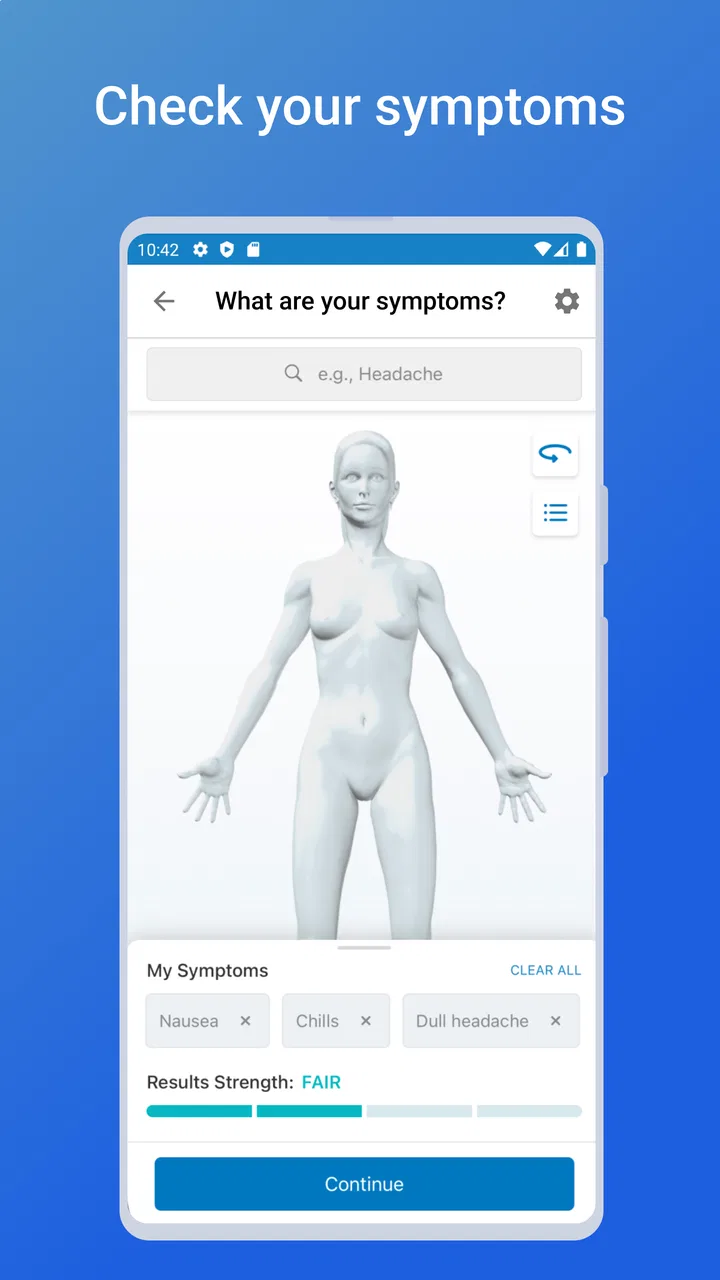
The symptom-checking side is designed for people who do not know the medical term for what they are experiencing. Instead of forcing me to begin with a precise diagnosis, it lets me start with a symptom and work through related details. That makes it approachable after a long day, when I may only know that my throat hurts, my skin is irritated, or I feel unusually tired.
The important habit is to slow down while answering. A rushed tap can send the process in an unhelpful direction, especially when several symptoms sound similar. I try to include the duration, severity, and surrounding circumstances as accurately as the app allows. I also avoid treating a likely explanation as a confirmed answer. The result is more useful when I take it into a conversation with a doctor rather than using it to cancel one.
Connectivity shapes this part of the experience in a very direct way. A symptom checker needs to retrieve and present health information as I move through its prompts, so I would not choose this app as my only resource during a trip with unreliable service. At home or on a stable mobile connection, the process feels much more practical. In a weak-signal area, waiting for a page or response can make an already stressful situation feel less reassuring.
Why the doctor finder is more useful after checking symptoms
The doctor-finding feature makes more sense when used after I have clarified what I want help with. If I search for care while still describing my concern vaguely, I may end up browsing without a clear purpose. A better workflow is to use the symptom tool first, write down the main points I want to mention, and then use the doctor finder to continue the search for professional support.
This is especially handy when I have moved, changed insurance circumstances, or need to look beyond the clinician I normally contact. Still, a search tool cannot decide which doctor is personally suitable for me. I would still check practical details before arranging a visit, including whether the provider handles my specific concern and whether the appointment fits my needs.
The connection also matters here because doctor information is inherently time-sensitive. I would not assume that a result means an appointment is immediately available or that every detail is current. The app can shorten the discovery stage, but I still need to verify the final arrangements through the relevant provider.
Reminders are the part that fits ordinary routines
The medication reminder feature addresses a different problem from symptom searching. Instead of asking what a symptom might mean, it helps me remember an action I have already decided to take. That makes it useful for a daily prescription, a short course of medicine, or a routine that becomes easy to overlook when my schedule changes.
My practical tip is to create reminders at a calm moment, not when I am already late. I would first check the medicine name, timing, and instructions against the label or advice from a healthcare professional. The app should support memory, not replace those instructions. If a dose is missed or a schedule changes, I would confirm what to do with a pharmacist or clinician rather than improvising from a notification.
Unlike symptom information and doctor searches, reminders can remain useful even when I am not actively browsing. That difference gives the app two distinct personalities: a connected information tool and a routine aid. I would judge the reminder experience by whether it fits naturally into my day, while judging the symptom checker by how clearly it helps me prepare for the next decision.
A realistic mobile scenario
Imagine that I am away from home, have developed a new cough, and realize that I am also forgetting an evening medicine. I could use the symptom checker while connected to organize the cough-related details, note when it began, and identify questions worth asking. I could then look for a doctor through the same app instead of opening several unrelated searches. Later, I could use the reminder function to keep the evening medicine from being overlooked.
That sounds simple, but the order matters. I would not use the app to decide that I am safe to ignore worsening symptoms. I would use it to reduce confusion, prepare a concise description, and move toward appropriate care. If the connection failed during the symptom search, I would stop relying on the app and use a known medical contact or urgent service instead.
Using it on a phone, handling interruptions, and protecting attention
A phone makes it easy to check a concern in the moment, but quick access can also invite distracted reading or unnecessary searching. I prefer to pause somewhere quiet, keep the session focused, and write down the useful points rather than trying to make a health decision while multitasking. The next section looks at those practical habits, including how I handle a disrupted flow without treating an incomplete screen as a complete answer.
Why mobile access is convenient but not automatically ideal
A phone is a natural place for this kind of tool because symptoms happen away from a desk and medication schedules follow me throughout the day. I can check something while sitting in a waiting room, prepare notes before calling a clinic, or set a reminder after collecting a prescription. The small screen also encourages short sessions, which suits a quick question better than a long research session.
At the same time, mobile use can make health information feel more casual than it really is. I might be standing in a noisy shop, walking between appointments, or trying to read while tired. Those conditions are not ideal for interpreting medical guidance. I prefer to use the app in a quiet place when the issue is more complicated, then save the important points in my own notes or repeat them to a professional.
Another useful approach is to separate information gathering from decision-making. I can use the app to collect possibilities and questions, but I should make the actual care decision with the seriousness it deserves. That small mental boundary prevents a convenient phone result from becoming an accidental diagnosis.
What happens when a search is interrupted
Network interruptions are more than an inconvenience in a medical app. If a symptom flow stops halfway through, I may not remember which answers I already gave or why the next question mattered. I would avoid repeatedly tapping buttons in frustration, especially if the app appears to be waiting for a response. Instead, I would note the symptoms separately and retry when the connection is stable.
For doctor searches, an interruption can leave me unsure whether the result list is complete. I would treat a partially loaded list as incomplete rather than assuming that the first visible option is the best one. This is a small but important recovery habit: when connectivity affects what I can see, I should not mistake missing information for a meaningful recommendation.
Medication reminders create a different recovery question. If I have already configured a reminder, I would not change the medicine schedule merely because the information screen is temporarily unavailable. The correct instructions remain the ones supplied by my clinician or pharmacist. If I am uncertain about a missed dose, I would contact a qualified professional instead of trying to reconstruct medical advice from memory.
Who benefits most from the combined feature set
I think the app is a strong fit for someone who wants one familiar place for three connected tasks: understanding a symptom well enough to describe it, finding a doctor to continue the conversation, and remembering an established medication routine. It can also help a family member prepare for a call on behalf of someone else, provided the information is checked carefully and the patient’s own medical context is respected.
It is less suitable for someone seeking a definitive answer from a symptom list, a person who needs continuous clinical monitoring, or anyone facing a possible emergency. In those situations, speed and professional assessment matter more than browsing convenience. I would also skip it as a primary tool if my internet access is consistently unreliable and I have no alternative way to reach medical help.
Using the app without wasting mobile data or attention
Because the experience includes connected health information and doctor searches, I would use it deliberately rather than repeatedly refreshing the same pages. I might gather the symptoms I want to check before opening the app, keep the search focused, and avoid treating every minor sensation as a reason to run another assessment. This is not only considerate of a limited data plan; it also reduces anxious browsing.
A second tip is to prepare a compact health note outside the app with medicines, allergies, relevant conditions, and questions for a clinician. I would not assume that entering one symptom gives the app all the context needed. Having those details ready makes a connected session more efficient and makes the eventual doctor conversation clearer.
Privacy also deserves attention whenever I use a medical service on a phone. I would read the app’s current privacy and account information before entering sensitive details, use a device protected with a passcode, and avoid discussing private symptoms aloud in crowded places. These are sensible precautions for any health app, but they matter particularly when convenience makes it tempting to share more than necessary.
How it compares with familiar alternatives
The usual alternative is a general web search. That can produce more variety, but it often mixes reliable medical sources with alarming, irrelevant, or poorly explained pages. WebMD: Symptom Checker gives me a more focused path, which is helpful when I want structure rather than a long list of links. The downside is that a guided flow may feel restrictive if my symptoms are unusual or do not fit neatly into its questions.
Another alternative is a dedicated medication reminder. A specialist reminder app may offer a more concentrated experience for people managing many medicines, while this app is more appealing to someone who wants reminders alongside symptom information and doctor discovery. I would choose the dedicated option if medication scheduling is my central need and the broader medical tools would only add clutter.
Calling a clinic directly remains better when I already know where I want to go, need advice tied to my records, or have a concern that requires immediate human judgment. In that situation, the app is most valuable as preparation: it can help me describe the issue and remember the questions I want to ask, but it should not become an extra barrier before making the call.
What the ratings and long availability suggest
WebMD: Symptom Checker has an average rating of 4.1 from roughly sixty-five thousand ratings, with more than ten thousand written reviews. It has passed ten million installs, which tells me it is a familiar choice for a large Android audience rather than a niche experiment. Those figures are useful context, but they do not guarantee that every symptom flow or reminder setup will suit my needs.
The app was released on May 6, 2011, and the current version is 11.33.0.13985528. That long presence suggests an established product that has had time to evolve, although a mature app can also feel broader and less streamlined than a tool built for one task. I would keep it updated through the official app store and check that my phone meets its minimum operating-system requirement of version 9 before expecting the current release to work as intended.
It is free to use and carries an Everyone age rating, which makes it easy to consider for general household use. Free access is convenient, but I would still judge it by whether it helps me make a better next decision, not by how many times I can open it. Medical usefulness comes from sensible interpretation and appropriate follow-up.
My connectivity verdict
After using it as a connected companion, I would recommend WebMD: Symptom Checker to people who want a broad medical toolkit on their phone rather than a single-purpose reminder or a raw web search. Its best moments come when I have a non-emergency concern, a stable connection, and a clear intention to prepare for professional care.
I would not rely on it during an emergency, as a substitute for a diagnosis, or as my only plan in a place with uncertain service. The most reliable workflow is to use the app while connected, record the important questions, verify medication decisions with a professional, and keep a direct route to medical help available.
The app earns its place by connecting information, doctor discovery, and routine reminders, but the final judgment must stay with me and a qualified healthcare professional. For that reason, I see it as a useful first step and an occasional organizer—not the last word on my health.
FAQs for WebMD: Symptom Checker
01What features does the WebMD: Symptom Checker offer?
WebMD: Symptom Checker provides users with a comprehensive tool to evaluate their health symptoms. It allows users to input various symptoms to receive potential medical conditions and advice. The app also offers a range of resources including articles, videos, and expert tips to help users better understand their health concerns.
02Is the WebMD: Symptom Checker app free to use?
Yes, the WebMD: Symptom Checker app is free to download and use. While it offers a wide range of features without any cost, there may be certain premium content or additional features that require in-app purchases. Users can explore most of the app’s essential features without any charges.
03How accurate is the diagnosis provided by the WebMD: Symptom Checker?
The Symptom Checker is a valuable tool for initial self-assessment, but it is not a substitute for professional medical advice. The app uses a large database of medical information to provide possible conditions, but users should always consult a healthcare professional for a definitive diagnosis and treatment plan.
04Does the WebMD app require an internet connection to function?
While some features of the WebMD: Symptom Checker app might work offline, it generally requires an internet connection to access the most up-to-date medical information and resources. For the best user experience and access to the latest data, an internet connection is recommended.
05Can the WebMD: Symptom Checker store personal health information securely?
Yes, the WebMD app is designed with user privacy in mind. It allows users to store their health information securely. However, users should always ensure they have the latest version of the app for enhanced security features and should review WebMD’s privacy policy to understand how their data is managed.
Pros
- Comprehensive medical database.
- User-friendly interface.
- Personalized health content.
- Regular updates on medical news.
- Trusted by healthcare professionals.
Cons
- Ads can be intrusive.
- Some features require an account.
- Limited offline accessibility.
- May cause unnecessary anxiety.
- Not a substitute for professionals.

WebMD: Symptom Checker
Gallery